Review Request Templates That Actually Get Responses

Review Request Templates That Actually Get Responses

These review request templates are ready to copy, paste, and send today — compliant with Google’s policies, FTC guidelines, and TCPA rules when you follow the instructions below.
Start with the three highest-impact formats:
- SMS post-service (send within 2 hours of service completion): “Hi [First Name], thanks for coming in today! If you have a quick minute, we’d love a Google review: [Direct Link]. — [Owner Name]”
- Email post-purchase (send same day or next morning): Subject: “How did we do, [First Name]?” Body: “Hi [First Name], thank you for your recent [purchase/visit]. Your feedback means a lot to us and helps other customers find us. Would you mind leaving a quick review? [Direct Link]. Thanks, [Owner Name]”
- Short follow-up (send 3–5 days after the first ask if no response): “Hi [First Name], just a quick follow-up — if you have 60 seconds, a Google review would really help our small business. [Direct Link]. Thank you!”
Pro Tip: Swap [First Name], [Owner Name], and [Direct Link] before every send. A message with a real name and a direct review link converts far better than a generic blast.
Key Takeaways
The most effective review request strategy combines owner-signed messages, precise timing, a single direct review link, and a private-feedback funnel for unhappy signals.
| Point | Details |
|---|---|
| SMS timing window | Send within 2 hours of service; owner-signed SMS with a direct link targets 25–35% conversion. |
| Email best practices | Keep emails under 120 words, use one direct review link, and personalize with name and service. |
| Founder voice outperforms | Owner-signed messages outperform formal copy by a factor of about two to three in open and click benchmarks. |
| Compliance non-negotiables | No incentives, no review gating, TCPA consent for SMS, and CAN-SPAM opt-out for email. |
| Escalate when needed | Defamatory or policy-violating reviews that survive Google’s flagging process warrant attorney-led removal. |
Table of Contents
- Why asking for reviews pays off for your business
- What are the rules you must follow before sending?
- When and how should you ask: email, SMS, or in-person?
- Copy-paste review request templates by scenario
- What to do when feedback turns negative
- Which tools and automation workflows should you use?
- How do you measure and improve your response rates?
- What actually works in practice, and what trips people up
- Sources
- FAQ
Why asking for reviews pays off for your business
The single biggest reason most small businesses have fewer reviews than they deserve: they never ask. Customers who had a great experience rarely think to leave a review unprompted, but social proof from reviews strongly influences buyer decisions at every stage of the purchase funnel.
For local SMBs, the business case is concrete:
- Search visibility: Google’s local ranking algorithm factors in review quantity and recency, so a steady stream of new reviews helps your Business Profile surface in map packs and local searches.
- Conversion lift: Shoppers who see a higher star average and more recent reviews are more likely to call, book, or walk in.
- Social proof for referrals: A strong review profile gives word-of-mouth referrals a place to land — people check your Google listing before they act on a friend’s recommendation.
SMS review requests sent within roughly two hours of service completion show conversion rates in the 25–35% range in Zinng.ai’s dataset, which is a meaningful lift over untimed or generic outreach. The channel and the timing matter as much as the words.
What are the rules you must follow before sending?
Keep every review request open-ended, neutral, and free of incentives. That single sentence covers the most common compliance failures.
Do not do any of the following:
- Offer discounts, gifts, or any reward in exchange for a review (public or private)
- Gate reviews by asking for private feedback first and only directing happy customers to post publicly — this is review gating, which Google prohibits
- Set staff quotas tied to review counts
- Hand a customer a tablet in-store and stand over them while they write a review
- Ask employees or friends to post reviews as if they were real customers
Google’s policy is clear: businesses may not “discourage or prohibit negative reviews or selectively solicit positive reviews from customers.” Requests must give every customer an equal opportunity to share their honest experience — positive or negative. Violating this can result in review removal or account penalties.
On the regulatory side, the FTC’s rulemaking on consumer reviews and testimonials requires clear disclosure whenever an endorsement is tied to compensation or an incentive. For SMS, the Telephone Consumer Protection Act (TCPA) requires prior written consent before sending marketing texts. Stick to customers who gave you their number as part of a transaction, and always include an opt-out option in your messages.
For a deeper look at what makes a review removable under Google’s own policies, Repvive’s policy violation guide breaks down the specific criteria.
When and how should you ask: email, SMS, or in-person?
Timing is the variable most businesses get wrong. The best template in the world underperforms if it arrives three weeks after the experience. Match the channel to how your customer already communicates with you, and send while the experience is still fresh.
Channel pros and cons at a glance:
- SMS: Highest open rates and fastest response, but requires TCPA-compliant consent. Subject line example (email only, not SMS): N/A — keep SMS to a single short message.
- Email: More room for context and a personal note; easier to include a review link with anchor text. Subject line examples: “How did we do, [First Name]?” / “Quick question about your visit” / “Your feedback matters to us”
- In-person: Works well for service businesses (salons, auto shops, restaurants) — a verbal ask plus a QR code card is low-friction and high-trust.
- In-app / receipt: Good for e-commerce; timing is automatic and the customer is already engaged.
Review request cadence:
- Send the first ask within the ideal timing window for your channel (SMS within 2 hours; email same day or next morning).
- Wait 3–5 days. If no review appears, send one follow-up — shorter than the original, friendly in tone.
- After the follow-up, send one final gentle nudge at day 7–10 if the customer is a repeat buyer or high-value contact.
- Stop after three touches. More than that crosses into pressure, which can backfire publicly.
Copy-paste review request templates by scenario
Choose the template that matches your situation, swap the tokens in brackets, and send. Every template below is written to comply with Google’s open-ended, neutral request standard.
Email templates
Post-purchase email
Subject: How did we do, [First Name]?
Hi [First Name],
Thank you for your recent [purchase / order / visit]. We hope everything arrived exactly as expected.
If you have a minute, we’d be grateful if you shared your experience in a Google review — it helps other customers find us and tells us how we’re doing.
[Leave a Review → Direct Link]
Thanks so much, [Owner Name], [Business Name]
Post-service email
Subject: Your feedback means a lot to us
Hi [First Name],
It was great [working with you / seeing you] on [service date]. We put a lot of care into every job, and hearing from customers like you helps us keep improving.
Would you mind leaving a quick Google review? It only takes about 60 seconds.
[Share Your Experience → Direct Link]
Warmly, [Owner Name]
Follow-up email (3–5 days after first ask)
Subject: Still thinking about your recent visit?
Hi [First Name],
Just a quick follow-up on my earlier note. If you haven’t had a chance yet, a short Google review would genuinely help our business. No pressure — even a star rating makes a difference.
[Leave a Review → Direct Link]
Thank you, [Owner Name]
Repeat customer email
Subject: You’ve been with us a while — we’d love your honest take
Hi [First Name],
You’ve been a customer for [X months / years], and that means a lot to us. If you’ve been happy with the experience, a Google review from a long-time customer carries real weight.
[Write a Review → Direct Link]
With appreciation, [Owner Name]
SMS templates
Post-service SMS (send within 2 hours)
Hi [First Name], thanks for choosing [Business Name] today! If you have 60 seconds, a Google review would mean the world to us: [Direct Link]. — [Owner Name]
Post-purchase SMS
Hi [First Name], your [product/order] is on its way! Once it arrives, we’d love to hear what you think: [Direct Link]. Thanks — [Business Name]
Follow-up SMS (3–5 days later)
Hi [First Name], just checking in — if you have a moment, a quick Google review really helps our small business: [Direct Link]. Thank you!
Unhappy customer routing template
If a customer signals dissatisfaction (low survey score, complaint, or negative tone in a reply), route them to a private channel before they post publicly. This is not review gating — you are not blocking them from posting. You are offering to resolve the issue first.
Private feedback SMS:
Hi [First Name], I’m sorry to hear your experience wasn’t what you expected. I’d like to make it right — can I reach you at this number, or would you prefer email? — [Owner Name]
Private feedback email:
Subject: Let’s fix this, [First Name]
Hi [First Name],
I heard your recent experience with us fell short, and I want to personally address that. Would you be willing to share more details so we can make it right?
You can reply directly to this email or call me at [Phone Number].
[Owner Name], [Business Name]
A compact channel-vs-scenario reference:
| Scenario | Best channel | Template type |
|---|---|---|
| Post-purchase (product) | Email or SMS | Post-purchase |
| Post-service (in-person) | SMS | Post-service SMS |
| Follow-up (no response) | Follow-up email | |
| Repeat / loyal customer | Repeat customer | |
| Unhappy signal detected | SMS or email | Private feedback routing |
Pro Tip: Top-performing review emails keep the body under 120 words and include exactly one review link. Two links or a long explanation reduces clicks. Write like you’re texting a customer you actually know.
Tone matters more than most businesses realize. Founder- or owner-signed messages outperform formal corporate copy by roughly 2–3x in open and click benchmarks across test datasets. Sign with your real name, not “The [Business Name] Team.”
What to do when feedback turns negative
Negative feedback handled well rarely becomes a public problem. The goal is to intercept the signal privately, resolve it, and only then consider whether to re-ask for a public review.
Private feedback templates to capture details:
- SMS: “Hi [First Name], I’m really sorry about your experience. I’d love to understand what happened and make it right. Can I call you, or would you prefer to reply here? — [Owner Name]”
- Email: Subject: “I want to make this right, [First Name]” — Body: “Hi [First Name], I heard your recent visit didn’t go as expected. I’d appreciate the chance to hear what happened directly. Please reply here or call [Phone]. — [Owner Name]”
Once you’ve resolved the issue, you can optionally re-ask: “Hi [First Name], I’m glad we were able to sort that out. If you feel the experience ended on a better note, we’d be grateful for an honest review: [Direct Link].”
Public response template for a negative review:
“Hi [Reviewer Name], thank you for sharing your experience. I’m sorry it didn’t meet your expectations. Please reach out to us at [Email/Phone] so we can make this right. — [Owner Name]”
Keep public responses short, empathetic, and free of defensiveness. Never argue the facts in public — it rarely ends well and signals to future customers that you don’t handle criticism gracefully.
Escalation checklist:
- Attempt private resolution within 24 hours of seeing the review.
- If the reviewer responds and the issue is resolved, ask if they’d consider updating or removing the review.
- If the review contains false statements of fact, personal attacks, or violates Google’s content policies, flag it for removal through Google’s reporting tool.
- If the review is defamatory, involves a competitor posting fake reviews, or Google’s standard removal process fails, consider attorney-led removal services as a next step. Repvive’s legal team handles exactly these cases, with no upfront fees and payment only after a successful removal.
For professional services firms, law firm reputation management practices offer a useful model for handling sensitive negative feedback in regulated industries.
Which tools and automation workflows should you use?
Automate the trigger and the send, but keep the personalization tokens and the owner signature. A message that looks automated converts at a fraction of the rate of one that feels personal.
Workflow examples:
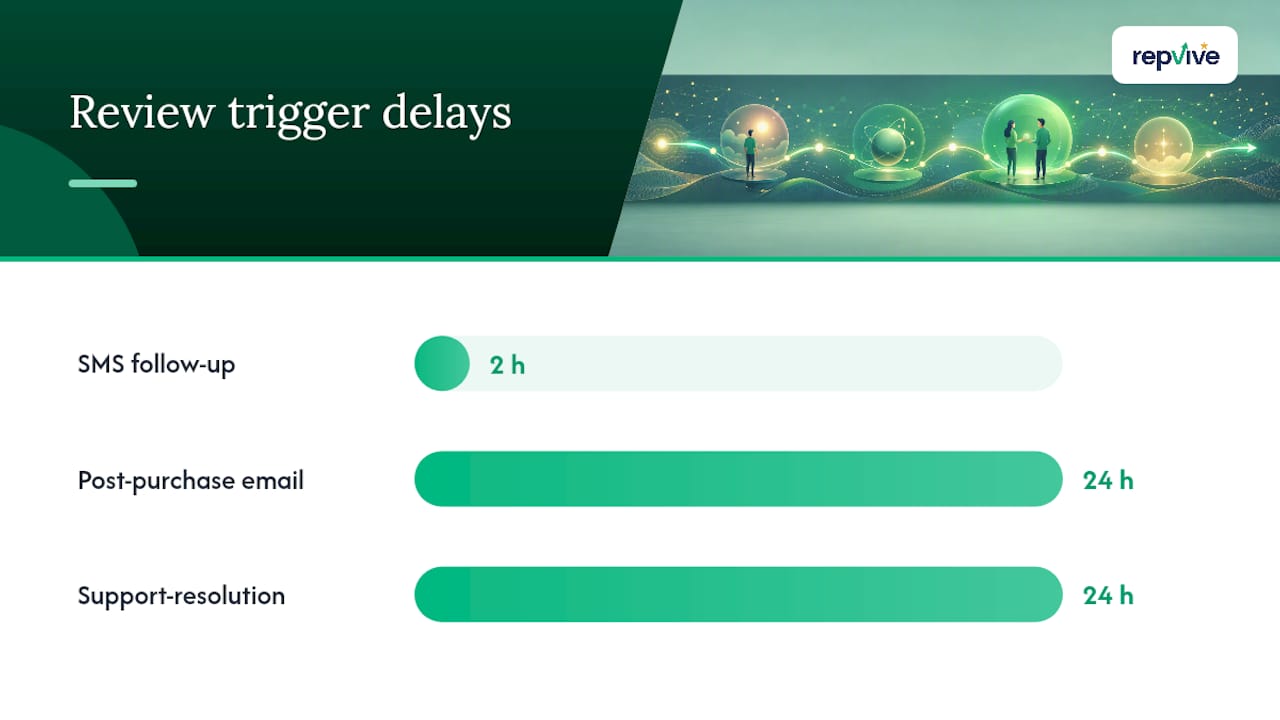
- Post-purchase email flow: CRM or e-commerce platform (Shopify, WooCommerce, HubSpot) triggers a review request email 24 hours after order fulfillment confirmation.
- SMS follow-up flow: Point-of-sale or scheduling software (Square, Mindbody, ServiceTitan) sends an SMS within 2 hours of appointment completion.
- Support-resolution trigger: Help desk tool (Zendesk, Freshdesk) sends a review request 24 hours after a support ticket is marked resolved and the customer confirms satisfaction.
What to look for in a review request platform:
- Direct review link support (generates a Google Business Profile review link automatically)
- TCPA-compliant SMS sending with opt-out management
- Merge fields for name, service, and date
- Reporting on open rate, click-to-review rate, and reviews added
- Ability to route low-score responses to a private feedback flow
Google Business Profile generates a direct review link you can embed in every template. Get yours from your Business Profile dashboard under “Ask for reviews” — it takes 30 seconds and is the single most important link in any review request.
Repvive’s RepBoost platform handles review collection, monitoring, and alert workflows in one place, built specifically for local SMBs who want owner-signed sends with automated triggers. WordStream’s channel guidance is also worth reading for a broader look at matching channel to customer type.
How do you measure and improve your response rates?
Track four numbers: open rate, click-to-review rate, conversion-to-review (reviews actually posted), and net change in your star average over 30 and 90 days. Everything else is secondary.
A/B test recipes to run:
- Subject line test: “How did we do?” vs. “Quick question about your visit” — run for 2 weeks with at least 50 sends per variant.
- CTA phrasing test: “Leave a Review” vs. “Share Your Experience” — small wording changes can shift click rates noticeably.
- Timing test: Same-day send vs. next-morning send for email; within 2 hours vs. 4–6 hours for SMS.
- One-link vs. funnel page: Direct Google review link vs. a landing page that routes by sentiment — test whether the extra step reduces or improves your public review rate.
Well-structured review request emails with the right timing, a single direct link, and personalization consistently outperform generic blasts in click-to-review rate. The 25–35% SMS conversion range cited in Zinng.ai’s dataset gives you a realistic ceiling to aim for with a well-timed, owner-signed text.
For sample size, run each A/B test until you have at least 100 sends per variant before drawing conclusions. For most SMBs, that means 2–4 weeks per test depending on volume.
Reporting cadence for SMBs:
- Weekly: check reviews added and any new negative reviews requiring a response.
- Monthly: review open rate and click-to-review rate by channel; adjust timing or copy if click rate drops below 10%.
- Quarterly: assess net change in star average and total review count vs. the prior quarter.
B2B review request programs with effective timing and personalization can deliver significantly higher response rates, which gives you a sense of how much headroom most businesses have before they’ve optimized their approach.
What actually works in practice, and what trips people up
The businesses that build strong review profiles consistently do two things right: they send the ask within hours of the experience, not days, and they sign it with a real name. That combination alone accounts for most of the performance gap between businesses with 12 reviews and businesses with 400.
The private-feedback funnel is the most underused tool in this stack. Most business owners either skip it entirely (and get blindsided by a public one-star) or implement it in a way that crosses into review gating. The line is simple: route unhappy signals to a private conversation to resolve the issue, but never block or discourage anyone from posting publicly. Done right, it catches problems before they go public and gives you a second chance to earn a good review from someone who was initially disappointed.
When a review crosses into defamation or clear policy violation, private resolution and Google’s flagging tool are the right first steps. If those fail, legal escalation through a service like Repvive is the appropriate next move — not a first resort, but a real one when the review is causing measurable harm and standard channels haven’t worked. Repvive’s customized removal claim process is worth understanding before you need it.
Sources
The compliance and timing guidance in this article draws from primary policy sources and template performance studies. Here are the key references worth bookmarking:
- How to Ask for Google Reviews: Compliant Templates & Scripts
- Reviewgen
- Rulemaking: Use of Consumer Reviews & Testimonials | Federal Trade Commission
FAQ
How do you write a review request?
Keep it short, personal, and open-ended. Use the customer’s first name, reference the specific service or purchase, include one direct review link, and sign with your real name. Never offer an incentive or ask only happy customers.
How do I send a review request to customers?
Match the channel to how the customer already communicates with you. SMS works best within 2 hours of service; email works well same-day or next morning. Use your CRM, point-of-sale system, or a dedicated review platform to trigger sends automatically after a transaction.
How do you ask for a review in a way that feels natural?
Write the way you’d talk to a customer in person: brief, warm, and specific. “Hi Sarah, it was great working with you today — if you have a minute, a Google review would really help us out: [link]. Thanks, Mike” feels human because it is. Avoid corporate templates that sound like they came from a call center.

What is review gating, and why is it against Google’s policy?
Review gating means asking customers for private feedback first and only directing satisfied customers to post publicly. Google prohibits this because it artificially filters out negative reviews, giving future customers a misleading picture of the business.
When should I escalate a negative review to a removal service?
Escalate when a review contains false statements of fact, violates Google’s content policies, or appears to be posted by a competitor or someone with no real customer relationship — and Google’s standard flagging process has not resolved it. That’s when attorney-led services like Repvive become the appropriate next step.